
Last updated on
Nov 7, 2026
MO MO-8453 2015-2026 free printable template
pdfFiller is not affiliated with any government organization

Fill out
Complete the form online in a simple drag-and-drop editor.

eSign
Add your legally binding signature or send the form for signing.

Share
Share the form via a link, letting anyone fill it out from any device.

Export
Download, print, email, or move the form to your cloud storage.
Why pdfFiller is the best tool for your documents and forms


End-to-end document management
From editing and signing to collaboration and tracking, pdfFiller has everything you need to get your documents done quickly and efficiently.
Accessible from anywhere
pdfFiller is fully cloud-based. This means you can edit, sign, and share documents from anywhere using your computer, smartphone, or tablet.
Secure and compliant
pdfFiller lets you securely manage documents following global laws like ESIGN, CCPA, and GDPR. It's also HIPAA and SOC 2 compliant.
What is MO MO-8453
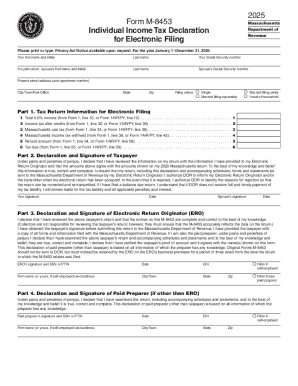
The Missouri Form MO-8453 is a tax document used by taxpayers to electronically file their individual income tax declarations in Missouri.
pdfFiller scores top ratings on review platforms




Who needs MO MO-8453?
Explore how professionals across industries use pdfFiller.

MO MO-8453 is needed by:
-
Individual taxpayers in Missouri
-
Spouses filing jointly
-
Electronic Return Originators (EROs)
-
Paid preparers of tax returns
-
Residents submitting state tax forms
Comprehensive Guide to MO MO-8453
What is the Missouri Form MO-8453 Tax Declaration?
The Missouri Form MO-8453 Tax Declaration is crucial for those engaging in electronic tax filing in Missouri. This form requires essential personal details, including your name, social security number, and address. It plays a significant role in the tax filing process by ensuring that the information is correctly submitted to the Missouri Department of Revenue.
The form aids in maintaining accurate records and facilitates easier communication with tax authorities, streamlining the overall tax process.
Purpose and Benefits of the Missouri Form MO-8453 Tax Declaration
The MO-8453 is an essential document for taxpayers in Missouri because it validates consent for electronic filing, which simplifies the tax submission process. By utilizing this form, taxpayers can enjoy several benefits, such as faster processing times and enhanced convenience when filing their returns.
Employing the Missouri Form MO-8453 enables individuals to complete their tax filings more efficiently, leading to overall time savings during the tax season.
Who Needs to Use the Missouri Form MO-8453 Tax Declaration?
This form is mandatory for various individuals within the tax ecosystem. Taxpayers, their spouses when filing jointly, Electronic Return Originators (EROs), and paid preparers are required to use it under certain circumstances. The necessity of this form typically arises in collaborative tax filing situations or when specific income thresholds are met.
Individuals must ensure their eligibility, as various criteria dictate who must submit the MO-8453.
Key Features of the Missouri Form MO-8453 Tax Declaration
-
Fillable fields for basic personal information.
-
Signature areas for the Taxpayer, Spouse, ERO, and Paid Preparer.
-
Direct deposit options to expedite refunds.
-
Checkboxes for important declarations regarding the tax filing.
-
Enhanced security features for electronic submissions.
How to Fill Out the Missouri Form MO-8453 Tax Declaration Online (Step-by-Step)
-
Access the form through pdfFiller.
-
Complete all required fields, including federal adjusted gross income and Missouri tax amounts.
-
Review the information entered for accuracy before submission.
-
Utilize the validation tools provided by pdfFiller to ensure correct data entry.
-
Submit the completed form electronically or via the preferred method.
Submission Methods and Deadlines for the Missouri Form MO-8453 Tax Declaration
Taxpayers have multiple submission options for the Missouri Form MO-8453, including electronic filing and traditional mail. It is crucial to adhere to specific deadlines set by the Missouri Department of Revenue to avoid penalties. Failure to file by the deadlines can result in significant late filing consequences.
Once submitted, tracking the status of your filing is essential to ensure proper delivery and compliance with tax regulations.
Common Errors and How to Avoid Them When Filing the Missouri Form MO-8453
-
Incorrectly entering social security numbers or personal information.
-
Failing to sign the form where necessary, especially in joint filings.
-
Omitting required fields like income amounts and tax withheld.
-
Misunderstanding eligibility requirements prompting the form's use.
Double-checking all information can significantly reduce the risk of rejections or delays in processing.
What Happens After You Submit the Missouri Form MO-8453 Tax Declaration?
After submission, taxpayers receive confirmation of receipt, which is a vital step in ensuring their filing has been acknowledged. Should any amendments be necessary, guidance is available for correcting the form, and taxpayers can expect to be informed of processing timelines.
Following up on the application status is advisable to address any potential issues proactively.
Utilizing pdfFiller for Your Missouri Form MO-8453 Tax Declaration Needs
pdfFiller significantly enhances the filing process for the Missouri Form MO-8453 by offering features such as eSigning capabilities, cloud storage, and efficient document management. The platform ensures top-notch security in handling sensitive tax information, complying with privacy regulations.
Users can rest assured that their tax documents are securely managed throughout the filing process.
Getting Started with Your Missouri Form MO-8453 Tax Declaration Today
Take the first step in your tax filing journey by utilizing pdfFiller for your Missouri Form MO-8453. The platform is designed to provide users with an efficient, user-friendly experience when completing their tax forms online. Should you need assistance, customer support options are readily available to help guide you through the filing process.
How to fill out the MO MO-8453
-
1.To begin, access pdfFiller's website and use the search bar to find 'Missouri Form MO-8453'. Click on the form to open it in the editor.
-
2.Once the form is open, familiarize yourself with its layout. You will see fillable fields including Name, Social Security Number, Address, and various checkboxes.
-
3.Gather necessary information beforehand, such as your personal identification details, Social Security Number, and specifics about your federal adjusted gross income, Missouri tax, and any taxes withheld.
-
4.Proceed to fill in each field with your information. Click on the appropriate boxes to answer questions regarding Direct Deposit and ensure all personal information is accurate.
-
5.After filling out the form, review each section carefully to confirm that all information is correct and complete. Double-check names, numbers, and income figures to avoid errors.
-
6.Finalize the form by signing in the designated areas: Taxpayer, Spouse, ERO, and Paid Preparer if applicable. Ensure each required party has signed where necessary.
-
7.Once you are satisfied with your completed form, look for the options to save or download. pdfFiller allows you to save in different formats.
-
8.Submit your form through the platform if that option is available, or download it and follow the instructions for mailing it to the Missouri Department of Revenue.

Who is required to sign the Missouri Form MO-8453?
The Missouri Form MO-8453 must be signed by the taxpayer and the spouse if filing jointly. Additionally, Electronic Return Originators (EROs) and Paid Preparers must also sign the form if they are involved in the submission.
What information do I need to complete the form?
You will need your personal identification details, including your name, Social Security Number, address, and details regarding your income, Missouri tax liability, and any taxes withheld from your income.
Are there deadlines for submitting the Missouri Form MO-8453?
Yes, the Missouri Form MO-8453 typically must be submitted in conjunction with your individual income tax return. Ensure timely submission to avoid penalties. The specific deadline often coincides with federal tax filing deadlines.
How can I submit the completed form?
The completed Missouri Form MO-8453 can be submitted electronically if filed through a software platform that supports electronic submissions. Alternatively, you can download it and mail it to the appropriate address provided by the Missouri Department of Revenue.
What are common mistakes to avoid when filling out the form?
Common mistakes include missing or incorrect Social Security Numbers, failing to sign the form, and entering inaccurate income details. Review the form thoroughly and ensure all required fields are completed before submission.
How long does it take for the form to be processed?
Processing times for the Missouri Form MO-8453 can vary. Typically, electronic submissions may be processed faster than paper submissions. It’s advisable to check the Missouri Department of Revenue's website for updates on processing times.
Do I need to notarize the Missouri Form MO-8453?
No, notarization is not required for the Missouri Form MO-8453. However, all required signatures must be present for the form to be valid.
MO MO-8453 Form Versions
Related Content
Related Forms



Get the latest insights from our blog


If you believe that this page should be taken down, please follow our DMCA take down process
here
.
This form may include fields for payment information. Data entered in these fields is not covered by PCI DSS compliance.